
RigReports home page
Search...
⌘K
Ask AI
Home
Login
Search...
Navigation
BHA Groups
Edit BHA Group
Welcome to RigReports
Getting Started
Add Contacts to a Distribution List
Add New Users
Create a New Job
Job Management
Assign Company Reps
Create/Edit Reports
Change the Date of a Report
Select Current Company Reps for a Report
BHA Groups
Create a new BHA Group
Edit BHA Group
Administration
Wells
AFE Management
FAQs
How do I let a User create or edit a report?
How do I change the date of a report?
How do I add new users?
How do I show Non-Users as Supervisors on a report?
How do I update a user's full name or role?
How do I remove a user access?
How do I add a plug?
Release Notes
Version 1.12.2
Version 1.11.1
Version 1.7.3
Version 1.7.2
Version 1.6.4
Version 1.5.1
Version 1.4.3
On this page
Open BHA Group Editor
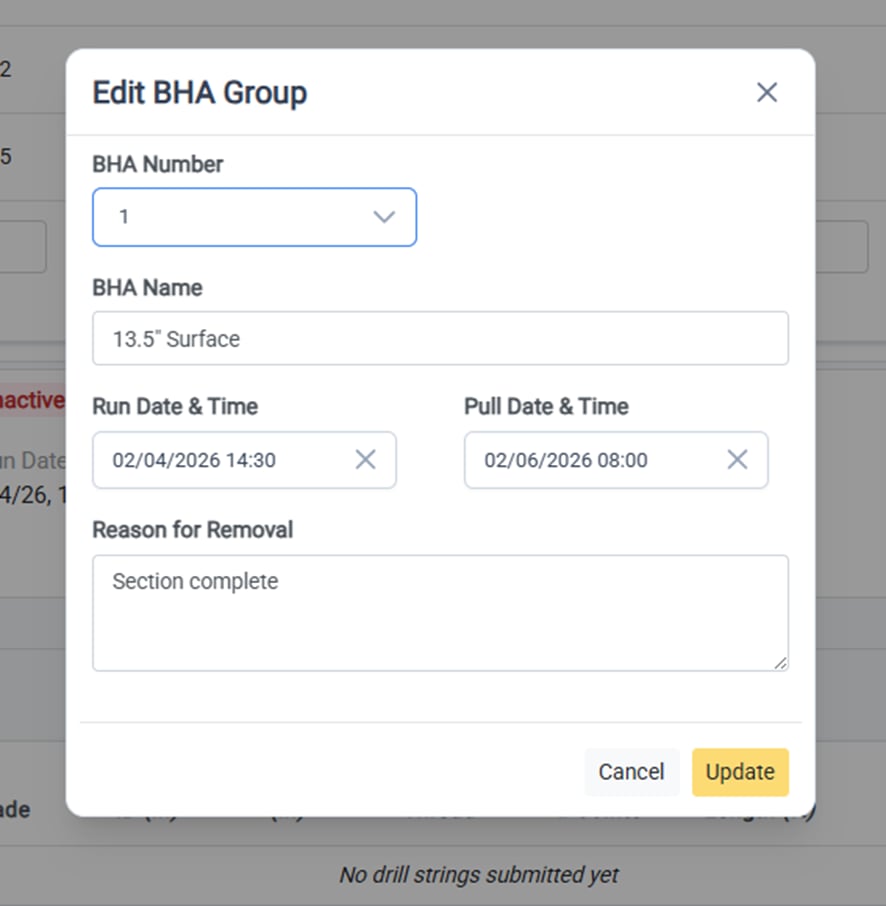
Edit the BHA Group Details
BHA Groups
Edit BHA Group
Open BHA Group Editor
To edit the details of an active or inactive BHA group, click
Actions
on the side of the BHA Group header to open the dropdown menu. From there, select** Edit BHA Group **to open BHA Group editor form.
Edit the BHA Group Details
The following details of the BHA Group can be edited at any time:
BHA Number
BHA Name
Run Date & Time (BHA install date)
Pull Date & Time (BHA removal date)
Reason for removal
To save the changes, click
Update
and the window will close and all changes will be reflected.
Create a new BHA Group
Add Wells and Fields
⌘I
Assistant
Responses are generated using AI and may contain mistakes.